
Licence · All guides
Licence
Unlock Cavvi on your phone
A licence bought on the website includes Cavvi on iPhone and iPad. Your Mac gives you the code.
- Mac
- iPhone
- iPad
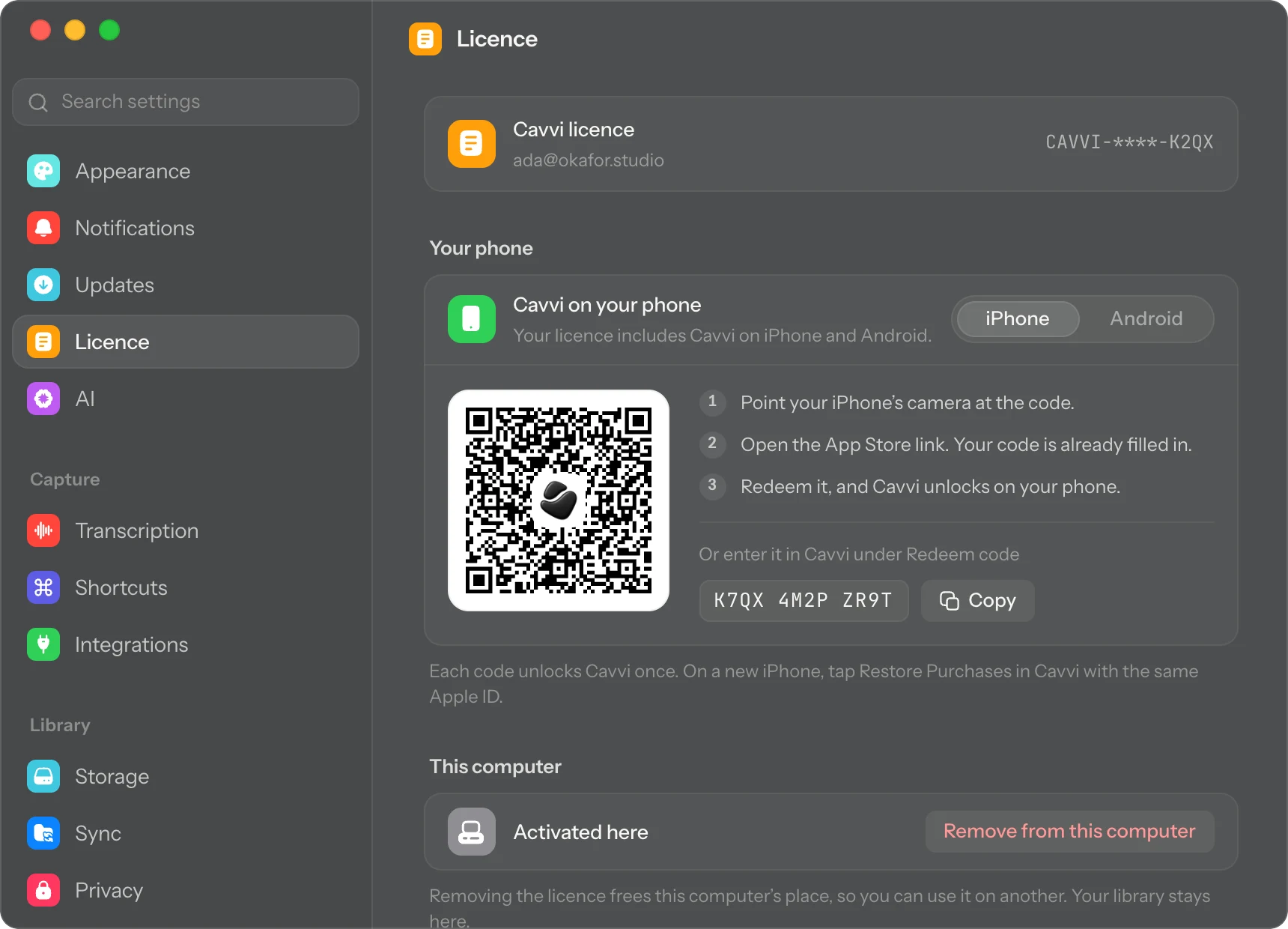
- Settings › Licence › Your phone
Cavvi for iPhone and iPad is coming soon, and your licence includes it. Your code appears on your Mac once Cavvi is activated there. If you haven't done that yet, see Buy and activate Cavvi on your Mac.
Scan the code
- On your Mac, press
⌘,to open Settings and choose Licence. - Under Your phone, choose iPhone.
- Point your iPhone's camera at the code and open the App Store link. Your code is already filled in.
- Redeem it, and Cavvi unlocks on your iPhone.
Type the code instead
Your Mac also shows the code as text, with a Copy button.
- Open Cavvi on your phone and tap the gear to open Settings.
- Tap Redeem code, then Redeem code again.
- Type the code from your Mac and redeem it.
Questions
Can I use the code again?
Each code unlocks Cavvi once. On a new iPhone or iPad with the same Apple ID, open Settings in Cavvi and tap Restore purchase instead.
It says my phone codes are on their way
They're still being prepared. Click Check again in a little while.